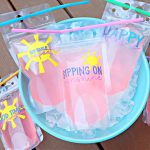
DIY Color Changing Drink Pouches
Yield: 0
Materials
- Reusable Drink Pouches
- Measuring Tape
- Cricut Maker, Cricut Explore Air or Cricut Joy
- StandardGrip Cutting Mat
- Fine Point Blade
- Cricut Vinyl in your favorite colors I used Cold-Activated Turquoise to Purple, Cold-Activated Light Pink to Magenta and Stone Yellow from the Summer Vinyl Sampler.
- Cricut Weeding Tools
- Cricut Scraper
- Cricut Transfer Tape
Instructions
- Measure your reusable juice pouch.
- Open Cricut Design Space. Create a rectangle the size of your juice pouch.
- Add your juice pouch designs to your design either by searching for the design you would like to use under "Images" or by uploading your design to Cricut Design Space under the "Upload" button.
- Size your design using the rectangle you added to your canvas as template for sizing. Once you have your designs sized correctly, hide your rectangle and then click "Make It".
- Follow the prompts on your screen to connect you machine, select your cutting material and cut each color of vinyl.
- Weed your vinyl removing the excess vinyl from around your design.
- Cut a piece of transfer tape slightly larger than your design. Peel the transfer tape off of the paper backing. Lay the transfer tape on top of your design. Use your scraper to scrape (also called burnishing) on top of the transfer tape pushing it against your vinyl. Flip your vinyl over and burnish on the back. Then carefully peel up your transfer tape making sure each piece of your design is attached to the transfer tape. Position your transfer tape where you would like your design on your drink pouch. Use your scraper tool to burnish the vinyl onto the drink pouch. Slowly peel up the transfer tape leaving your vinyl design behind on your drink pouch. Repeat for each piece/color of your design.
- Fill your drink pouch with a cool summer drink and watch the color of your Cold-Activated vinyl change!